Trapdoor
|
Got more Salesforce.com logins that you can shake a stick at? get them under control with Trapdoor. Trapdoor securely stores
all your Salesforce.com logins in the system provided keychain, and can quickly login to Salesforce.com for any of them.
|
Quick Start
Launch Trapdoor, and it'll automatically list all your keychain entries for Salesforce.com. These appear in both the Login menu and in the Dock's context menu. Simply select one of the entries from either menu and trapdoor will quickly login you in. Don't have any keychain entries yet for Salesforce.com, don't despair, just goto File -> Add New Login to create some.
Tip: For maximum benefit, use the Dock Context menu to have Trapdoor automatically start at when you login to your Mac.
Trapdoor In Action
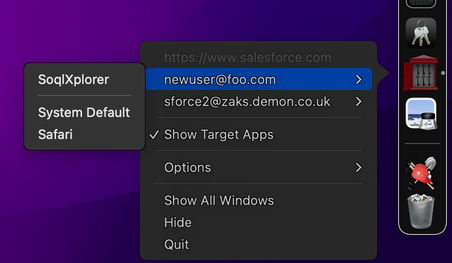
The dock context menu
Select an existing login to launch it with the configured application. If you select the "Show Target Apps" option then the menu will expand to allow you to select a specific application to launch. The default application assigned to the login will appear at the top of the list.

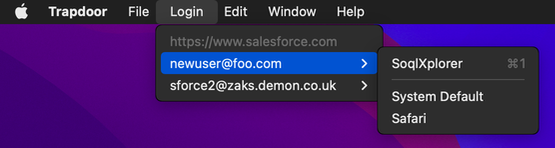
The Login menu
Click a login to launch it, or click one of the specific applications from the submenu.
The New Credentials window
You have the option to use different browsers for different usernames. New for v1.13, Trapdoor can now also launch SoqlX directly.
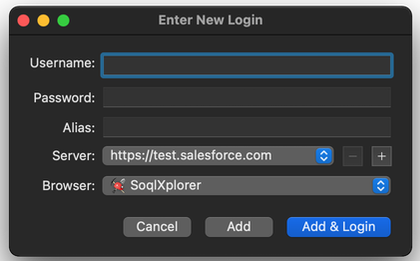
Tip: Alias is optional, but set one for each login, and it'll appear along with the username on the lists of logins to make it easier to differentiate them.
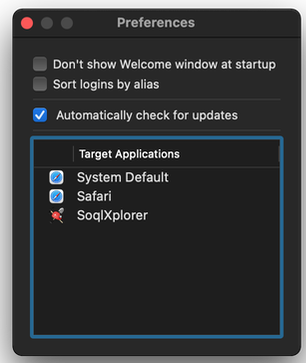
Preferences Window
You can view the list of browsers detected, and adjust other preferences.
System Requirements
Requires Mac OSX 10.14 or later, and at least one Salesforce.com accountDownload the latest version of Trapdoor
If you're still on a version of OSX earlier than 10.14, then Trapdoor v1.11 supports OSX 10.9 and up.
Release History
v1.13, Nov 18, 2021
- Launch SoqlX directly from Trapdoor.
- Updated to support Dark Mode and Apple Silicon.
- Can now launch any valid app directly from the menu (instead of having to set it as the app).
- Updated to current version of Sparkle. (The auto updater feature)
v1.11, Feb 24, 2017
- Updated to work around a salesforce issue related to incorrectly applying my-domains cookies to API requests.
- Updated to the latest version of zkSforce.
- Updated how the UI URL is calculated, no longer needs to do describe calls.
- Updated to handle deprecation of login via www.salesforce.com.
v1.10, March 17, 2016
- Enable support for TLS 1.1, 1.2 [so that it'll keep working when TLS 1.0 get disabled server side]
v1.9, May 29, 2014
- Added support for being able to interact with Trapdoor via AppleScript, thanks @_MattWelch_!
- App is signed with a DeveloperId, no more gatekeeper warnings.
v1.8, May 18, 2010
- Fixed an issue related to using Fluid app's causing trapdoor to crash at start up.
v1.7, March 4, 2010
- Option to sort logins by alias instead of username.
- All Installed browsers are automatically detected, no need to wait for Trapdoor updates to support new browsers anymore.
- You can view the list of installed browsers in the preferences window.
- The browser lists now show their icon.
v1.6, Feb 24, 2010
- Added Google Chrome to list of browsers
v1.5, Aug 13, 2009
- Expired passwords are now handled correctly, you'll be prompted to supply a new password, your password will then be updated in both Salesforce.com and your Keychain.
v1.4, Sept 14, 2007
- There's now keyboard shortcuts for the first 9 entries in the login menu.
v1.3, July 11, 2007
- The Usernames are now displayed sorted, making it easier to find the one you want.
v1.2, May 1, 2007
- For each Login you can now specify a specific browser to launch (or have it launch the system default browser).
- A "Manage All Logins" window now makes it easy to change browser settings, edit aliases, etc. without having to use Keychain Access.
- Spiffy new icon from the fine folks at ADN
v1.1, Feb 21, 2007
- Now detects keychain change as they happen, and updates the list of Logins.
- Failed logins (because of a changed password) will now prompt you with a new password and automatically update the keychain entry.
- You can now enter an alias for each login and it'll appear in the menu to help you differentiate your logins more easily.
v1.0, Jan 26, 2007
- Initial release.
- Updated to work around a salesforce issue related to incorrectly applying my-domains cookies to API requests.
- Updated to the latest version of zkSforce.
- Updated how the UI URL is calculated, no longer needs to do describe calls.
- Updated to handle deprecation of login via www.salesforce.com.
v1.10, March 17, 2016
- Enable support for TLS 1.1, 1.2 [so that it'll keep working when TLS 1.0 get disabled server side]
v1.9, May 29, 2014
- Added support for being able to interact with Trapdoor via AppleScript, thanks @_MattWelch_!
- App is signed with a DeveloperId, no more gatekeeper warnings.
v1.8, May 18, 2010
- Fixed an issue related to using Fluid app's causing trapdoor to crash at start up.
v1.7, March 4, 2010
- Option to sort logins by alias instead of username.
- All Installed browsers are automatically detected, no need to wait for Trapdoor updates to support new browsers anymore.
- You can view the list of installed browsers in the preferences window.
- The browser lists now show their icon.
v1.6, Feb 24, 2010
- Added Google Chrome to list of browsers
v1.5, Aug 13, 2009
- Expired passwords are now handled correctly, you'll be prompted to supply a new password, your password will then be updated in both Salesforce.com and your Keychain.
v1.4, Sept 14, 2007
- There's now keyboard shortcuts for the first 9 entries in the login menu.
v1.3, July 11, 2007
- The Usernames are now displayed sorted, making it easier to find the one you want.
v1.2, May 1, 2007
- For each Login you can now specify a specific browser to launch (or have it launch the system default browser).
- A "Manage All Logins" window now makes it easy to change browser settings, edit aliases, etc. without having to use Keychain Access.
- Spiffy new icon from the fine folks at ADN
v1.1, Feb 21, 2007
- Now detects keychain change as they happen, and updates the list of Logins.
- Failed logins (because of a changed password) will now prompt you with a new password and automatically update the keychain entry.
- You can now enter an alias for each login and it'll appear in the menu to help you differentiate your logins more easily.
v1.0, Jan 26, 2007
- Initial release.